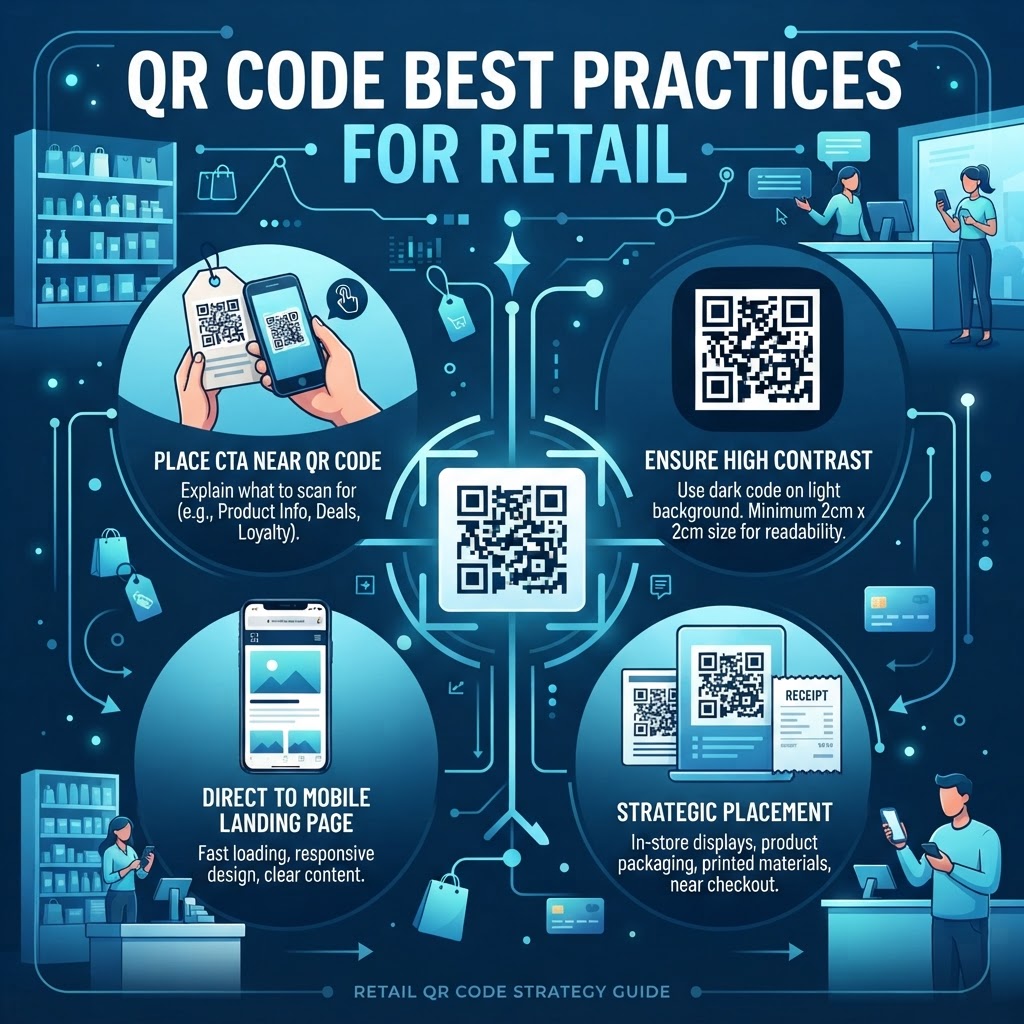
1. Why this matters in 2026
The retail environment in 2026 is defined by the demand for instant gratification and contactless interaction. Many businesses have moved away from traditional paper-based catalogs and static signage in favor of dynamic, trackable digital gateways. QR codes have become the standard bridge for this transformation. When a customer walks into a retail store, they often have their smartphone in hand, ready to compare prices, read reviews, or check inventory. By integrating QR codes into your retail strategy, you are meeting the customer exactly where they are, facilitating a journey that feels intuitive and technologically sophisticated.
Beyond convenience, the strategic deployment of QR codes allows for deep data collection that was previously impossible in physical retail spaces. By utilizing the analytics tools available at qr-code-placement-best-practices, retailers can track exactly when, where, and how their physical collateral is being engaged with. This data provides invaluable insights into consumer behavior, allowing for iterative improvements in store layout, product placement, and promotional offers. In 2026, retailers who ignore this data-driven feedback loop risk being left behind by more agile competitors who can optimize their storefronts in real-time based on actual user engagement metrics.
Finally, the rise of personalized retail experiences relies on the ability to direct traffic efficiently. A physical store can only hold so much information on a shelf tag, but a QR code acts as a portal to infinite product details, sustainability reports, or video demonstrations. This capacity for storytelling builds trust and loyalty, which are the currencies of modern commerce. When you implement a robust QR code strategy, you are essentially increasing the "surface area" of your store, transforming limited shelf space into a comprehensive resource for informed shoppers who want to feel confident in their purchase decisions.
2. How it works technically
Understanding the technical foundation of a QR code is essential for anyone aiming to use them professionally. At its core, a QR code is a two-dimensional matrix barcode capable of storing significantly more information than a traditional linear barcode. It works by encoding data into a grid of squares, which a camera lens scans and then interprets through a process called image processing. The camera identifies the three larger squares in the corners of the code, which serve as positioning patterns, allowing the software to orient the code correctly regardless of the angle of the scan.
One of the most important technical aspects for retailers is the concept of 'error correction.' QR codes are designed to remain scannable even if they are partially obscured or damaged. For example, if a retail sticker is partially peeled or crinkled, high-level error correction allows the smartphone to reconstruct the missing data bits accurately. Retailers must choose the appropriate level of error correction—usually between 7% and 30%—depending on the intended environment. For outdoor signage where dirt or weather might damage the code, higher error correction is necessary to ensure the user experience remains uninterrupted.
Another technical layer involves static versus dynamic QR codes. A static code encodes the URL directly into the pixel pattern, meaning it cannot be updated once generated. Conversely, dynamic codes—the ones we recommend for most professional applications—contain a short URL that redirects to the final destination. This allows you to change the destination URL at any time without having to print new physical materials. This flexibility is vital for retail, where promotional landing pages, seasonal offers, or inventory availability change frequently. Understanding these technical foundations enables retailers to create reliable, long-lasting digital assets.
3. Step-by-step guide using blueqrcode.com
Getting started with high-quality QR codes is a straightforward process when you use a platform that prioritizes reliability and user experience. To begin, navigate to blueqrcode.com, where you can select the specific type of content you want to link. Whether you need a how-to-make-a-qr-code-for-wifi or a link to a high-converting landing page, the interface is designed to simplify complex backend processes. The first step is to input your destination URL or content type, ensuring that you are using a secure, HTTPS-based link to maintain user trust during the redirect process.
Once the content is set, the next step is customization. While many users default to black-and-white, retail branding often benefits from color-matching the QR code to your specific color palette. However, a critical warning is to maintain high contrast. A dark-colored code on a light background is the gold standard. After visual adjustments, you should generate a test version. Always scan this with multiple devices—both iOS and Android—to confirm that the framing, size, and loading speed of the destination page are optimal. If you are struggling with the design, our guide on qr-code-placement-best-practices offers deeper insights into technical configurations.
Finally, once you have created the code, it is imperative to download it in the correct format. For printing on banners or large retail signage, use vector formats like SVG or EPS. These files do not lose quality when scaled, ensuring that your code remains crisp even when stretched to fit a window display. For smaller labels, high-resolution PNGs are often sufficient. After the code is deployed in your retail store, monitor its performance via the dashboard. Use this analytics data to determine if the placement is effective or if it needs to be moved to a higher-traffic area of the store.
4. Best practices for deployment (size, placement, format)
Deployment strategy is often the deciding factor in whether customers actually use a QR code. The first rule of thumb is accessibility: the code must be placed at eye level or in a position that encourages natural interaction. For example, placing a code on a shelf edge, a product hangtag, or a checkout counter ensures that the customer has the time and the physical proximity to interact with it comfortably. If a code is placed too high on a wall or too low on a baseboard, the friction caused by the physical effort to reach it will result in a significant drop-off in scanning rates.
Regarding size, the general rule is to ensure the code is large enough to be scanned from a distance of at least two to three times its size. For instance, if you have a code on a product tag, it should be at least one inch by one inch to account for camera focus latency on older smartphones. For larger posters or storefront signage, the code should be significantly bigger to accommodate pedestrians walking by at a distance. If the code is too small, users will grow frustrated trying to zoom in, often abandoning the attempt altogether. Retailers should also ensure that the environment is well-lit; codes in dark corners or high-glare glass displays will rarely be scanned successfully.
Lastly, consider the 'Clear Zone' or 'Quiet Zone.' Every QR code needs a white border around it to differentiate it from the surrounding visual noise of your retail store. If you pack the area around the code with text, images, or patterns, the camera will struggle to detect the boundary of the QR code. Keep the surrounding space clean and provide a clear call to action (CTA). Simply placing a code is often insufficient; tell the customer what to expect, such as "Scan for a 10% Discount" or "Scan to See Product Specs." This incentive makes the interaction meaningful.
100% Free — No signup required
Create your QR Code Best Practices for Retail in seconds
Create Free QR Code →5. Common mistakes to avoid
One of the most frequent errors retailers make is neglecting to test the user experience on the destination page. A QR code is only as good as the mobile website it leads to. If the landing page is not mobile-optimized, takes longer than three seconds to load, or requires a login to view basic product information, you have already lost the customer. Ensure that your landing page is lightweight and responsive. Another mistake is using static codes for dynamic campaigns. If you print 5,000 tags with a static code and the URL breaks, you are forced to reprint everything, which is a massive waste of time and resources.
Another common pitfall is over-designing the code to the point of unreadability. While it might be tempting to add your logo to the center of the code or add intricate shapes, doing so can sometimes confuse scanning software. Always test your branded codes extensively on a variety of devices, including budget smartphones with lower-quality camera sensors. If your branding obscures the data modules, the code will fail. Stick to simple, high-contrast designs that respect the integrity of the QR grid while still reflecting your visual brand identity.
Finally, many businesses fail to track their results effectively. Without tracking, you are operating in the dark. You won't know if your codes on the store shelf are outperforming your codes on the receipt, or if your morning traffic sees more scans than your evening traffic. This data is critical for staffing and inventory management. Avoid the "set it and forget it" mindset; review your scan data weekly and adjust your physical collateral accordingly. If a particular display isn't generating scans, consider changing the CTA or testing a new, more prominent location in the store.
6. 3-4 concrete use cases by industry/sector
In the apparel sector, retailers are using QR codes to bridge the gap between physical inventory and digital size guides. A shopper can scan a code on a clothing tag to see how a garment fits on different body types, view available colors not currently in the store, and read customer reviews. This reduces the number of items taken into the dressing room and provides a more comprehensive shopping experience. Another powerful application is the whatsapp-qr-code-for-clothing-store-tutorial, which allows shoppers to immediately start a conversation with a personal stylist to ask about stock availability or sizing recommendations.
In the home goods and furniture sector, QR codes provide a solution for large, bulky items that cannot be fully showcased on a store floor. By placing a QR code on a small floor model or a display sign, retailers can link customers directly to an Augmented Reality (AR) experience where they can visualize the furniture in their own living space. This tech-forward approach removes the uncertainty of buying large, expensive items. It effectively turns the store into a showroom where the physical floor space is used as a gateway to an expansive, virtual inventory catalog.
In the grocery and supermarket sector, transparency is key. Retailers are now using QR codes to provide 'farm-to-table' stories. A customer scanning a code on a package of organic produce can view the exact farm where it was grown, the certification date, and even the harvesting process. This builds significant brand equity and trust. Additionally, some stores use QR codes at the checkout to offer digital receipts, which is a great way to build a customer database for loyalty programs, replacing paper waste with a sustainable and data-rich digital interaction.
7. Summary and next steps
Successfully integrating QR codes into your retail operations requires a balance of strategic planning, thoughtful design, and constant refinement. As we have discussed, this is not just about placing a barcode on a wall; it is about creating a seamless, data-rich experience that assists your customers while providing your team with actionable analytics. By focusing on accessibility, clear calls to action, and mobile-first landing pages, you can ensure that every scan translates into a meaningful touchpoint for your brand. Remember that your QR strategy should be iterative—start by deploying in a few high-traffic areas, analyze the performance, and then scale your efforts based on what works best for your specific customer base.
As you move forward, consider exploring more advanced use cases such as integrating QR codes with loyalty programs, payment systems, or personalized promotional engines. The tools available at blueqrcode.com provide the flexibility and reliability needed to support these initiatives. Whether you are aiming to increase engagement, provide better information, or simply modernize your storefront, the key is to keep the user experience at the forefront of every decision. Start by reviewing your current store layout and identifying areas where a QR code could add genuine value to the shopper.
We invite you to log in to your account at blueqrcode.com and begin testing these strategies today. If you need inspiration, feel free to browse our blog for more detailed guides, such as our qr-code-placement-best-practices article, which provides additional tips on optimizing your signage. The future of retail is interactive, and by adopting these best practices now, you are positioning your business to thrive in a digital-first world. Continue to monitor your metrics, listen to customer feedback, and refine your approach—the possibilities for growth are immense.
No watermark · No expiry · Works on all phones
Your QR code is ready in under 30 seconds.
Generate Free QR Code →