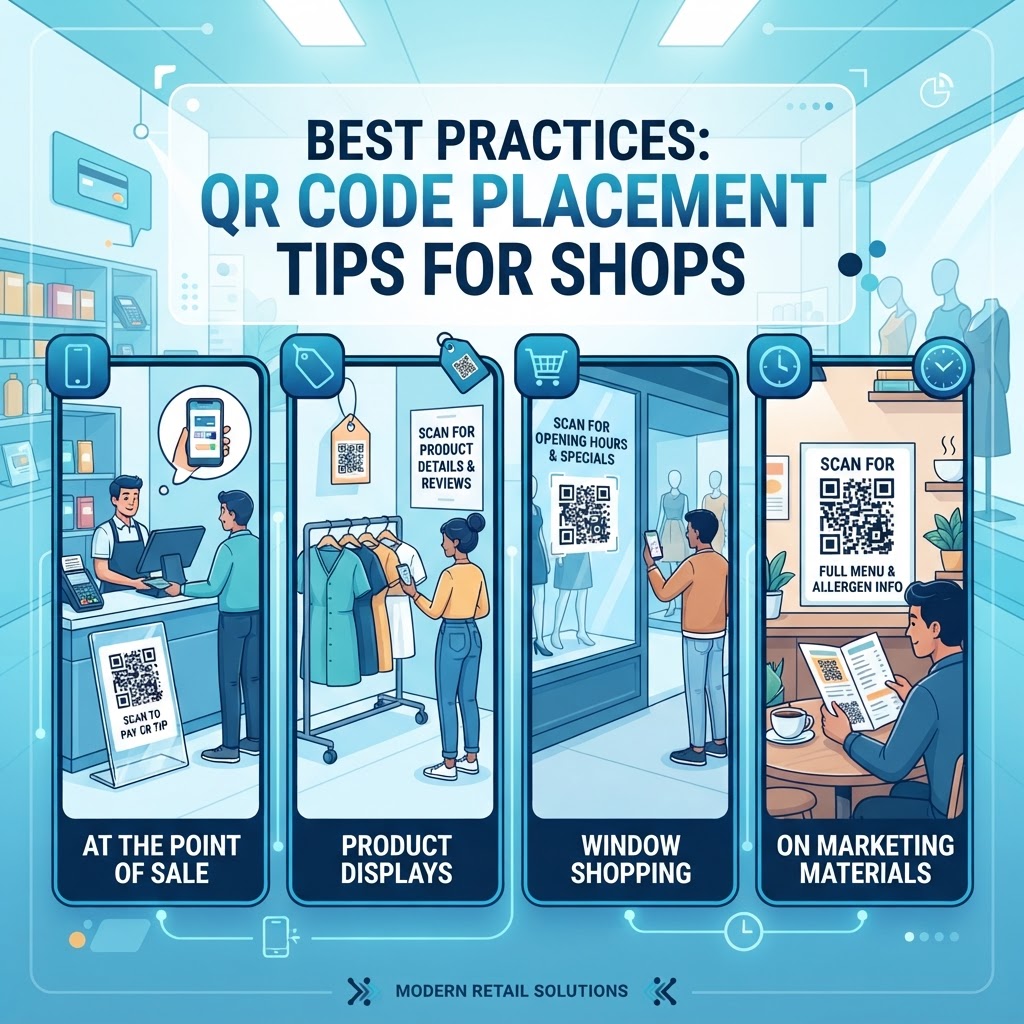
1. Why this matters in 2026
The retail industry has undergone a significant digital transformation, and by 2026, the QR code has solidified its place as the bridge between offline shoppers and online storefronts. In an era where most smartphones come equipped with built-in scanning capabilities, the barrier to entry for digital engagement has effectively vanished. However, the physical placement of these codes remains the most significant hurdle for businesses looking to convert casual passersby into engaged customers. Many businesses fail to realize that a QR code is not just a barcode; it is a gateway to a curated digital journey. When strategically placed, these codes can automate customer service, boost online reviews, or streamline the transition to e-commerce, effectively turning a static display window into a dynamic, interactive storefront.
Furthermore, consumer expectations regarding time and efficiency have reached new heights. Shoppers no longer want to manually type URLs into their browser or search for store profiles on social media platforms. They expect instant gratification. If your QR code is placed too high for a short person to reach, or in an area with poor lighting and no cellular signal, you are essentially closing a door on a potential transaction. By mastering placement, shop owners can guide customers through a planned marketing funnel, starting from initial awareness to the final purchase. This level of control over the customer journey is what differentiates top-tier retailers from those struggling to stay relevant in a highly digitized market. Utilizing professional tools like those found at qr-code-placement-best-practices allows you to manage these touchpoints effectively while maintaining a clean, professional aesthetic that respects the shop's branding and layout design.
2. How it works technically
At its core, a QR code functions as a two-dimensional matrix that stores data in a pattern of black and white squares. When a customer uses their phone camera to scan this pattern, the device's software interprets the geometry and translates it into a digital instruction. This instruction is usually a URL, which then directs the user’s mobile browser to a specific destination—be it a landing page, a product manual, a payment portal, or a digital vCard. Understanding this technical handshake is crucial for placement; since the phone’s camera relies on optics, the environment must be optimized to ensure the code is readable from the expected distance of the viewer. Factors like light reflection, physical obstruction, and the quality of the print all play a role in whether the code scans in a fraction of a second or fails entirely.
Technical constraints are often overlooked by shop owners who assume any printed graphic will suffice. In reality, the contrast between the background and the foreground of the QR code is the most critical technical parameter for readability. If you print a code on a highly reflective glass surface, the glare from storefront lighting can make it impossible for a scanner to decode the matrix. Furthermore, the size of the code must scale proportionally with the distance from which you intend the user to scan it. A small, high-density QR code might look crisp on a computer screen but become a blurred mess when printed on a large window display meant for passersby. By choosing a reputable free-qr-code-generator-no-sign-up-no-watermark, you ensure that the error correction levels are properly calibrated to handle minor distortions, which is a major advantage for real-world environmental deployment.
3. Step-by-step guide using blueqrcode.com
Creating a functional and trackable QR code is a simple process when using a dedicated platform like blueqrcode.com. Start by identifying the specific action you want the user to take. If you are looking to drive engagement, you might want to create a code that leads to a specific URL or a PDF document. Once you have defined your goal, head over to the generator and input your target content. It is essential to choose a static or dynamic code based on your needs; dynamic codes are highly recommended for shop owners because they allow you to update the destination URL without having to reprint your physical signage, which saves significant time and money over the long term. This flexibility is vital when running temporary promotions or rotating seasonal inventory.
After entering your data, use the customization tools to align the code with your brand identity. You can adjust colors, frame shapes, and even embed a small logo in the center to build trust and recognition. Before hitting the print button, always perform a series of field tests. Scan the code using different models of smartphones to ensure that the lighting and resolution are sufficient. A critical part of this workflow involves tracking the performance of your codes. Once they are deployed, use the analytics features to see how many people are scanning your codes and when. This data helps you refine your placement strategy; if you notice high engagement on a code by the door but low engagement on a code in the back of the store, you can adjust your strategy accordingly. For detailed instructions on specific types of codes, refer to guides like the vcard-qr-code-for-accountant-tutorial to see how professional-grade integration can elevate your business presentation.
4. Best practices for deployment (size, placement, format)
Deployment is where the strategy meets reality. The golden rule of QR code placement is accessibility. A code should never require the user to perform an awkward physical maneuver, such as bending down or stretching up. Place your codes at eye level, which is generally between 48 and 60 inches from the ground. This height range accommodates most adults and ensures the code is within the natural field of vision for a browsing shopper. When it comes to size, the minimum recommended printed size is roughly 2 inches by 2 inches for a close-range scan, such as on a product tag or menu. For larger displays, such as window graphics or event posters, the code should be significantly larger, following a ratio of 10:1—meaning for every 10 units of distance, the code should be at least 1 unit wide.
Format also plays a critical role in the user's perception. Avoid placing QR codes on irregular, curved, or bumpy surfaces, as these can distort the pattern and make scanning frustrating. Flat, matte-finish materials are ideal because they minimize glare and provide excellent contrast. Additionally, consider the surrounding environment. If your shop is dimly lit, make sure the area near the QR code is well-illuminated to help the camera focus quickly. You should also ensure that the area around the code is clear of clutter; if a code is surrounded by a dozen other posters or distracting images, the user may not even realize it is a scannable element. Keep the surrounding design sparse and include a clear call to action, such as "Scan to View Catalog" or "Scan for 10% Off," so users know exactly what to expect.
100% Free — No signup required
Create your QR Code Placement Tips for Shops in seconds
Create Free QR Code →5. Common mistakes to avoid
The most common mistake shop owners make is assuming that the presence of a QR code is enough to guarantee scans. Often, businesses place codes in "dead zones" where customers are likely moving quickly, such as right inside the entrance where they are navigating around other people. Another frequent error is using a broken or outdated URL. Nothing kills customer enthusiasm faster than scanning a code only to be met with a 404 error page. Always test your codes immediately after installation and perform periodic checks to ensure the destination link remains active. Ignoring the importance of a clear call to action is also a fatal flaw; without a prompt, many customers will simply walk past the code without knowing what value it provides.
Furthermore, avoid using low-contrast color combinations, such as light gray on white or dark blue on black, which significantly hinder the scanner's ability to pick up the pattern. Another major mistake is over-complicating the visual design of the QR code. While customization tools allow for vibrant patterns and logos, going overboard can make the code unreadable to standard smartphone cameras. Keep the design simple, and always prioritize functionality over aesthetics. Finally, neglecting to provide a backup or alternative method for customers who cannot scan the code—such as a short, easy-to-type URL—can exclude a segment of your audience. While QR codes are highly effective, they should be part of a broader marketing strategy rather than the only way to reach your digital content. By avoiding these pitfalls, you maintain a professional image and maximize the utility of your digital assets.
6. 3-4 concrete use cases by industry/sector
Different industries can utilize QR codes in unique ways to enhance the shopping experience. For a clothing store, placing a QR code on the clothing tag itself allows customers to quickly view the garment's full sizing guide, fabric care instructions, or even see photos of how the item looks on different body types. This provides instant value that a physical tag cannot offer. Similarly, in a supermarket setting, placing QR codes on shelves next to local produce can link shoppers to a story about the farm, the harvest date, and serving suggestions. This builds a connection with the consumer and fosters brand loyalty. For more information on how to implement these strategies, look into resources like qr-code-for-supermarkets to see how inventory-based codes drive engagement.
Another high-impact use case is for specialized shops like jewelry or high-end electronics. Placing a small, elegant QR code on the display stand can launch a product demonstration video, allowing the customer to see the features in action without requiring a sales associate to interrupt their browsing. For coffee shops or bakeries, placing a QR code at the counter that directs customers to a digital loyalty program or a menu for pre-ordering can significantly reduce wait times during peak hours. By catering to the user's specific intent at the moment of discovery, these use cases demonstrate how strategic placement functions as a powerful tool for customer relationship management. Whether you are a small boutique or a larger retail chain, the principle remains the same: provide relevant information where the customer is already looking, and remove the friction from the digital interaction.
7. Summary and next steps
Implementing QR codes in your shop is a low-cost, high-impact strategy that aligns perfectly with the mobile-first behavior of today's consumers. By focusing on eye-level placement, high-contrast print, and clear, enticing calls to action, you can bridge the physical and digital divide effectively. Remember that your goal is not just to display a code, but to facilitate a valuable interaction that benefits both the shop and the shopper. As we move further into the decade, the ability to deliver instant, mobile-friendly digital experiences will continue to be a defining factor in retail success. Do not just rely on one-time setups; monitor your analytics, test different placements, and keep your content fresh to ensure your QR codes remain a vital part of your business operation.
The next steps are simple: audit your store today, identify three potential high-traffic areas where a QR code could provide immediate value, and create your designs at blueqrcode.com. Start with a test run, gather feedback, and observe how your customers interact with your new digital touchpoints. If a certain placement isn't yielding the results you expect, move it, change the call to action, or update the destination content. With this iterative approach, you will find the sweet spot that drives traffic and increases engagement in your shop. Keep evolving your strategy, stay mindful of user feedback, and watch as these small, simple patterns become a cornerstone of your growth strategy. Your journey toward a more connected, efficient, and customer-centric retail environment begins with the very next code you generate.
No watermark · No expiry · Works on all phones
Your QR code is ready in under 30 seconds.
Generate Free QR Code →