Why This Matters in 2026
As we navigate the culinary landscape of 2026, the integration of digital tools within restaurants has become a baseline requirement rather than a premium feature. The primary driver of this shift is the need for frictionless service. Customers now expect to access information—be it nutritional data, allergen lists, or drink menus—at the exact moment they sit down. A well-implemented QR code strategy allows restaurant owners to bridge the gap between their physical presence and their digital brand footprint. By providing immediate access to your content, you reduce the workload on front-of-house staff, allowing them to focus on high-touch hospitality tasks rather than administrative ones. Furthermore, the ability to update a dynamic QR code means that your menu can reflect real-time inventory changes, daily specials, or seasonal rotations without the need for costly reprints. This agility is essential in a market where food costs and availability are constantly fluctuating. Beyond operational efficiency, these tools are central to modern marketing. They serve as entry points for data collection, feedback loops, and loyalty program enrollment. When you consider the ubiquitous nature of modern smartphones, providing a simple, scannable portal for your guests is the most effective way to encourage deeper interaction with your brand. Ignoring these technical touchpoints means losing out on valuable customer data that could otherwise inform your future menu planning and service adjustments. Ultimately, the focus on QR codes is about creating a personalized, tech-forward journey that resonates with the modern diner’s demand for instant, reliable information at their fingertips.
How It Works Technically
Understanding the technical architecture behind a QR code is essential for any restaurant manager looking to maintain consistent service. At its core, a QR code is a two-dimensional matrix barcode that stores data, typically a URL, which redirects the user's smartphone to a specific digital destination. When a guest points their camera at the code, the device's native firmware processes the pattern of black and white squares, interprets the encoded URL, and opens the link in the device’s default web browser. In the context of restaurants, the most critical distinction to understand is the difference between static and dynamic codes. A static code embeds the URL directly into the pixel pattern; once created, it cannot be changed. If you need to update a URL—such as changing your menu link—you would need to generate an entirely new code. Conversely, dynamic codes, such as those offered by QR Code Restaurant Menu, store a short-link that redirects to your final destination. This allows you to update the underlying content without changing the printed QR code itself. This is vital for restaurants that frequently rotate their offerings. Furthermore, the error correction level is a technical parameter often overlooked. QR codes are designed with built-in redundancy, meaning a portion of the image can be obscured or damaged, and the code will still function. However, increasing the error correction level makes the code more complex and potentially harder to scan at a distance. Balancing aesthetic design with scan reliability requires choosing the right dimensions and high-contrast color schemes. By mastering these technical fundamentals, you ensure that every guest has a rapid, successful experience that builds trust in your technological infrastructure.
Step-by-Step Guide Using blueqrcode.com
Using a reliable platform is the first step toward a successful digital integration. At blueqrcode.com, the process is streamlined to ensure you can deploy your codes in minutes. First, define the purpose of your QR code: are you linking to a full menu, a QR Code for Table Reservation, or perhaps a guest feedback form? Once your destination URL is prepared, navigate to the generator. Select the QR code type—Dynamic is highly recommended for restaurants because it allows for tracking scan analytics, which is essential for understanding which tables or marketing materials generate the most interest. Paste your URL into the input field provided. You will then have the option to customize the design. While a standard black-and-white code is the most reliable, you can subtly integrate brand colors, though you must ensure there is sufficient contrast against the background to remain scannable. Once generated, download the file in a high-resolution format like PNG or SVG. SVG is particularly useful if you plan to print your codes on large-scale signage or banners, as it remains crisp regardless of size. Before you print hundreds of table-top cards, test your QR code thoroughly. Use a variety of mobile devices, including both popular operating systems, to confirm the scan speed and the destination's load time. A slow-loading menu or a broken link is a major deterrent for guests. After testing, your code is ready for deployment across your restaurant. Remember to use the dashboard on blueqrcode.com to monitor the performance of your codes over time, as this data will help you refine your marketing and service strategies as your business grows.
Best Practices for Deployment (Size, Placement, Format)
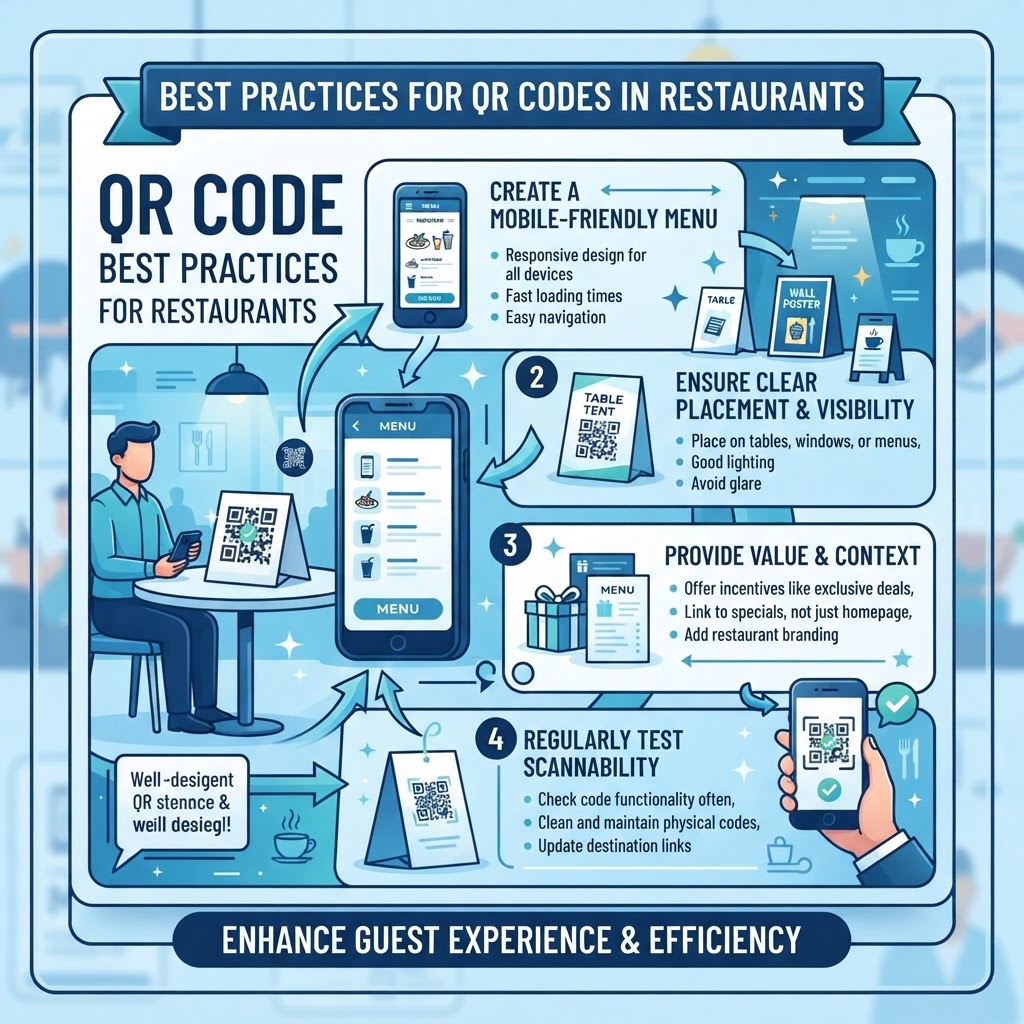
Deployment is where the theoretical value of your QR code meets the reality of your dining environment. The best placement for a QR code is determined by the guest’s natural line of sight and the physical constraints of the table. A good rule of thumb is to place codes at eye level or on the table surface in a spot that does not interfere with food service. If you are using table tents, ensure they are sturdy and easy to clean, as liquids and food debris can obscure the code. Regarding size, the minimum recommended size for a QR code is 2 inches by 2 inches. Anything smaller may cause scanning issues for guests with older smartphones or those struggling with poor lighting. Lighting is a frequently overlooked factor; if your restaurant features dim, atmospheric lighting, ensure your QR codes are printed on non-reflective material to prevent glare from overhead lights. For high-traffic areas, like an entrance or a host stand, consider placing the code on a larger display so guests can scan it as they wait. Furthermore, the context of the scan matters—if the code is meant for a menu, it should be the most prominent element on the card. Avoid overcrowding the design with excessive branding, as the user’s priority is scanning and moving on. Consistency is also key; if you use a specific style of QR code design, keep it uniform across all your marketing assets, from menus to window decals. This creates a cohesive brand experience that guests will quickly learn to recognize and trust whenever they visit your establishment, ultimately leading to higher engagement rates and a more streamlined service process.
100% Free — No signup required
Create your QR Code Best Practices for Restaurants in seconds
Create Free QR Code →Common Mistakes to Avoid
Many businesses fall into traps that can frustrate diners and diminish the effectiveness of their QR strategy. One of the most common mistakes is the "unoptimized mobile experience." If your QR code leads to a PDF file that is massive, difficult to zoom, or formatted strictly for a desktop screen, your guests will likely give up within seconds. Always ensure your destination is a responsive web page that is built for mobile devices. Another critical error is failing to provide a clear Call to Action (CTA). Simply placing a lonely QR code on a table leaves the guest guessing—are they supposed to scan it for a drink menu, the Wi-Fi, or a survey? Always accompany the code with a brief, clear prompt like "Scan for our seasonal menu" or "Scan to see our allergen information." Furthermore, never link to a URL that requires a login, a password, or the download of a specific app. The friction of registration is a massive barrier that will result in a near-zero scan rate. Another frequent mistake is using poor-quality print materials. A faded, crinkled, or stained QR code will not be recognized by modern camera sensors. Regularly inspect your table-top codes for wear and tear, and replace them as soon as they show signs of degradation. Lastly, avoid the mistake of over-relying on QR codes to the point where it alienates guests who prefer traditional service. Always provide a physical backup for those who are less tech-savvy or who simply prefer the tactile experience of a printed menu, ensuring your hospitality remains inclusive for every single patron who walks through your doors.
3-4 Concrete Use Cases by Industry/Sector
In the culinary sector, QR codes serve diverse functions beyond just the menu. One highly effective use case is the QR Code for Restaurant Survey. By placing a QR code on the final receipt or a small card included with the check, you make it incredibly easy for diners to leave feedback while their experience is still fresh in their minds. This direct line of communication is invaluable for managing your reputation. Another vital use case is in the beverage industry, specifically for wine bars or craft breweries. A QR code can lead to a dynamic list of rotating taps or a deep dive into the story behind a specific vineyard, enhancing the educational aspect of the dining experience without cluttering the physical table. For event-heavy venues, QR codes are a lifesaver for managing guest flow; for instance, a code at the door can lead directly to a digital waitlist or reservation portal, reducing the burden on your host stand during busy Friday nights. Additionally, fast-casual restaurants can benefit from integrating QR codes into their loyalty programs. By having a code that links directly to a digital sign-up form, you can capture customer emails and mobile numbers in real time, building a database for future promotional campaigns. These tactical applications demonstrate that the power of the QR code lies in its versatility—it can be a menu, a customer service representative, a marketing tool, or an operational assistant, depending on how you configure the destination URL to meet the specific needs of your restaurant's unique business model.
Summary and Next Steps
In conclusion, the successful integration of QR codes into your restaurant's operations is a multifaceted endeavor that pays dividends in both efficiency and guest satisfaction. By prioritizing user-friendly design, choosing a robust platform like blueqrcode.com, and placing codes in intuitive locations, you can significantly enhance the speed and quality of your service. Remember that this technology is not a one-and-done solution; it requires ongoing monitoring, regular testing, and the occasional pivot in your digital strategy to stay relevant to your guests' evolving preferences. As you move forward, start by auditing your current QR implementation. Are your links currently driving results? Are your codes easy to find and scan? Use the data provided by your dynamic QR codes to determine which digital assets are providing the most value, and refine your approach accordingly. The next steps for your restaurant should involve creating a consistent look-and-feel across all your touchpoints and ensuring that every member of your staff is trained to help guests who might have trouble navigating the digital menu. By treating your digital infrastructure with the same care and attention as your culinary offerings, you create a holistic dining experience that delights the modern consumer. Keep experimenting, keep testing, and continue leveraging the digital tools at your disposal to build a more responsive, profitable, and guest-centric restaurant business. The future of dining is here, and with a bit of technical foresight, you can ensure your establishment is leading the way in operational excellence and customer engagement.
No watermark · No expiry · Works on all phones
Your QR code is ready in under 30 seconds.
Generate Free QR Code →