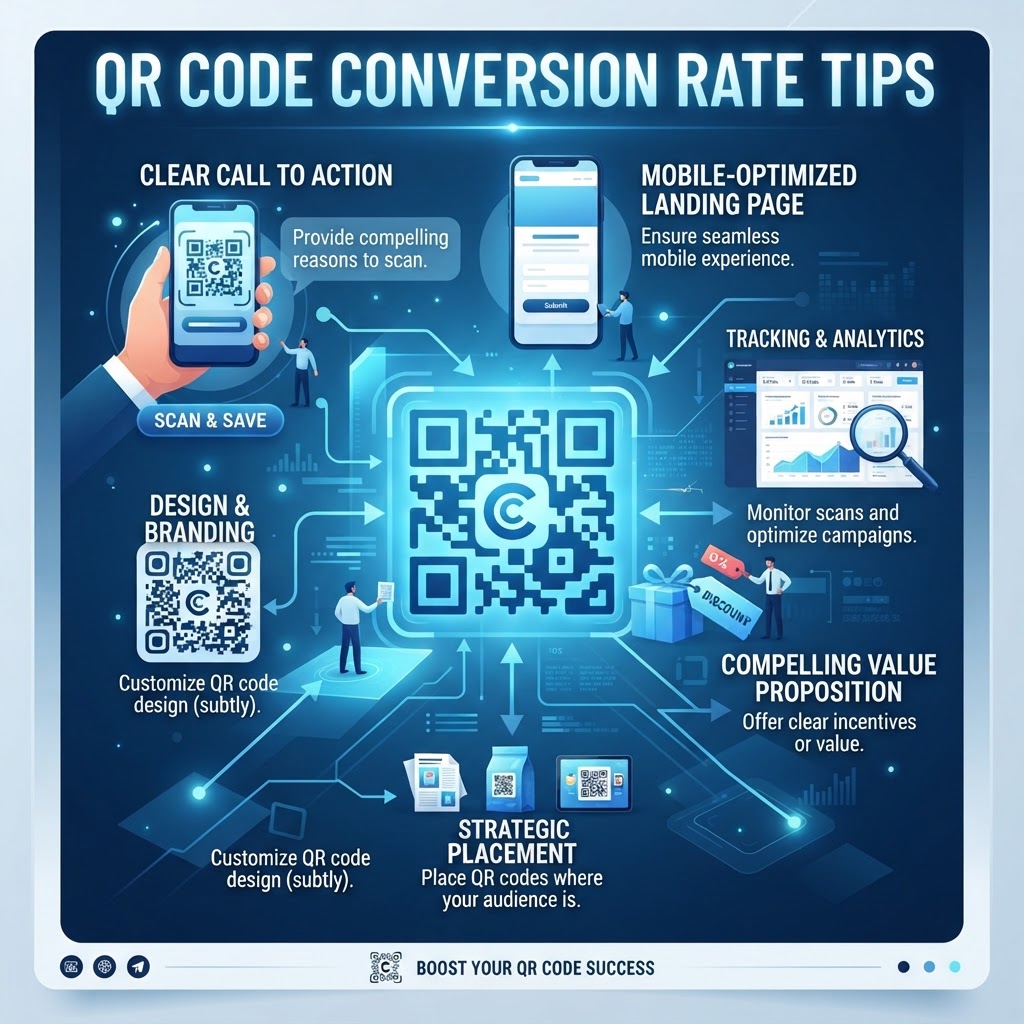
Why This Matters in 2026
As we move further into 2026, the reliance on contactless, instant access to information has become an ingrained habit for most consumers. When a user sees a QR code, they have split-second expectations regarding how it should function and what value it provides. If a code is poorly placed, unclear in its purpose, or aesthetically confusing, it will be ignored in favor of other, more intuitive brand interactions. Improving conversion rates for QR codes is not about tricking the user, but rather about aligning the physical environment with the user's immediate needs.
For many businesses, the QR code acts as the front door to their digital strategy. If that door is difficult to find or hard to open, you lose potential engagement before the user even considers your offer. In 2026, audiences are discerning; they value speed and clarity. By optimizing your deployment strategy, you ensure that your QR Code Placement Best Practices align with the user journey. When a user interacts with a code, they are often on the go, in a physical retail space, or attending an event. If the destination URL, Wi-Fi login, or PDF form is not immediately accessible, the connection is broken. Focusing on the conversion rate means obsessing over the context of the scan. You must bridge the gap between physical curiosity and digital completion by providing clear incentives that make the scan worthwhile. Whether you are using a QR Code vCard Business Card Digital or directing users to a landing page, the goal is to make the transition so seamless that the user feels they have gained value immediately. This is the difference between a static image and a functional tool that drives growth.
How It Works Technically
At its core, a QR code is a matrix barcode that encodes information in a grid of pixels. When a camera or scanner on most smartphones reads the pattern, it decodes the information—most commonly a string of text, a URL, or configuration data for connectivity—into a machine-readable format. Technically speaking, the density of the code increases as you add more characters to the data string. A simpler URL or piece of text results in a less complex, cleaner grid, which is significantly easier for hardware to interpret quickly under various lighting conditions. This technical simplicity is the foundation of high-performance scanning.
When you use Free QR Code Generator No Sign Up No Watermark tools, you are essentially generating a static representation of a fixed destination. Unlike processes that involve intermediate redirects, a static code provides an immediate connection to the target URL or data. This is an advantage for reliability because it eliminates the potential for server-side errors or lag during the resolution process. Technical efficiency is achieved by keeping the payload minimal. Avoid encoding excessively long URLs; instead, rely on concise structures that keep the matrix clean. High contrast is another technical requirement. The sensor in a smartphone camera relies on the distinction between the dark modules (the data points) and the light background. If this contrast is compromised by busy backgrounds or low-resolution printing, the decoding software will struggle to isolate the patterns. By ensuring that the code maintains a quiet zone—a white border area—around the perimeter, you allow the camera hardware to lock onto the image without interference from surrounding printed text or graphics. Understanding these physical limits is essential for anyone looking to increase their conversion rates, as technical failure is the quickest way to end a user's journey.
Try it now: Generate a free QR Code Conversion Rate Tips →
Step-by-Step Guide Using blueqrcode.com
Generating a high-conversion QR code on blueqrcode.com is a straightforward process, but it requires intentionality to be successful. First, identify your specific call to action. Is the code for a Wi-Fi connection, a contact card, or a specific webpage? Having a clear goal is the first step in driving high engagement. Once you have your destination, navigate to the generator. You will find that the interface is designed to strip away complexity, allowing you to focus on the input data. Input your URL or data carefully, ensuring there are no typos, as static codes cannot be modified once they are printed.
Next, focus on the visual output. While blueqrcode.com offers various options, always prioritize legibility over overly intricate design elements. For example, when you prepare a How to Make a QR Code for WiFi card, ensure the code is large enough to be scanned from a comfortable distance. Once you have generated the image, download it in a high-resolution format, preferably a scalable vector format if you intend to print it on large materials like posters or signage. Before committing to a large print run, test your code on multiple devices, including older smartphones and those with varied camera qualities. This simple quality assurance step is the most overlooked strategy for ensuring high conversion rates. If the scan is slow or fails on your test device, it will likely fail for your audience as well. Always keep your generated file organized and labeled, as once you move to the deployment phase, consistency in your asset management will save you time and prevent errors. The process on blueqrcode.com is built for speed and reliability, enabling you to produce clean, static assets that serve your business needs without unnecessary complications or hidden costs.
Best Practices for Deployment (Size, Placement, Format)
Deployment is where theory meets reality. A perfectly generated QR code will fail if it is displayed in an environment that is hostile to the scanning process. The most important rule for deployment is accessibility. If a customer has to bend over, kneel, or stretch to scan a code, they likely will not bother. Place your codes at eye level whenever possible, especially in retail or service environments. The size of the code must correspond to the distance from which you expect the user to scan it. A small code on a tabletop menu is perfectly fine, but a similar-sized code on a billboard or a window storefront will be impossible to scan.
Consider the surface material. Matte finishes are generally superior to glossy or reflective finishes, as they do not create glare under artificial lighting. If you must place a code on a window, ensure that the background behind the glass is not too cluttered, as this can confuse the phone's autofocus. Lighting is another critical factor. A code in a dark hallway or a shadowed corner of a lobby will result in a poor conversion rate because the hardware cannot resolve the image. Furthermore, provide a clear "value proposition" near the code. Simply printing a square does not tell the user why they should scan it. Include a brief, compelling sentence like "Scan to join our guest network" or "Scan for the digital menu." Without this prompt, the conversion rate will naturally drop as users are unsure of the outcome. Always ensure the code is large enough to be easily contained within the frame of a standard smartphone camera app. By respecting these physical constraints, you optimize for the user experience, which is the ultimate driver of high conversion rates and sustained digital engagement.
100% Free — No signup required
Create your QR Code Conversion Rate Tips in seconds
Create Free QR Code →Common Mistakes to Avoid
Many businesses fall into the trap of overcomplicating their QR codes, leading to poor performance. One of the most common mistakes is attempting to customize a code to the point of illegibility. While it might be tempting to integrate logos or colors that do not provide high contrast, these artistic choices often conflict with the fundamental requirements of QR code scanning. Remember that the scanning software is essentially looking for high-contrast patterns; if your color scheme is too subtle, the scan will fail, and the user will move on. Another frequent error is failing to test the code in the exact environment where it will live. A code that scans perfectly on your desk might fail when subjected to the overhead lighting of a retail store or the vibration of a moving vehicle.
Additionally, do not assume that every user is a technical expert. Provide the URL or a short link below the QR code for users who might struggle with the scan or who prefer to type the information manually. This dual-approach strategy ensures that you capture the user regardless of their preference or technical ability. Also, be wary of printing codes on materials that degrade over time. If a code is placed in an area with high sunlight, the ink might fade, or if it is in a high-traffic area, the surface might become scratched or obscured by dirt. Regularly audit your physical assets to ensure they remain in pristine condition. Finally, avoid placing multiple, unrelated QR codes in close proximity to each other. This creates "visual noise" that frustrates users and leads to mis-scanning, where the user scans the wrong code and ends up at the wrong destination, leading to immediate drop-offs in your conversion funnel.
Concrete Use Cases by Industry/Sector
In the hospitality industry, QR codes have revolutionized the guest experience. For a restaurant, using a code for a QR Code Restaurant Menu allows for real-time updates without the need to reprint physical menus constantly. By placing these codes at the center of the table with a clear, engaging call to action, restaurants see much higher engagement compared to static booklets. In the real estate sector, agents are increasingly using codes on yard signs to provide instant access to property details. This allows potential buyers to view photos and specs immediately while standing in front of the house, satisfying their curiosity before they leave the premises.
For retailers, the How to Make a QR Code for a Product strategy is a powerful way to bridge the physical and digital shopping experience. By placing a code on the shelf or product tag, a brand can provide detailed size guides, ingredient lists, or assembly videos that would never fit on a standard label. This information helps the consumer make an informed decision, which can significantly influence their purchase intent. In the world of events and professional services, a simple digital contact code on a business card allows for immediate addition to a contact list, bypassing the manual entry process. Across these sectors, the common thread is the reduction of friction. When you use these tools to provide immediate, specific utility, the conversion rate is naturally higher because you are solving a problem for the user at the exact moment they need assistance, whether it is for ordering food, buying a home, or connecting with a professional contact.
Summary and Next Steps
Improving your QR code conversion rate is a holistic process that begins with understanding user intent and ends with meticulous physical deployment. In 2026, the brands that succeed are those that treat the QR code as a legitimate, high-value bridge rather than an afterthought. By utilizing the simple, robust, and free tools available at blueqrcode.com, you can create consistent and reliable entry points for your digital assets. Remember that the technical foundation of your code, the clarity of your placement, and the value proposition you offer are the three pillars of your success. If one is missing, the entire system is weakened.
Your next step should be an audit of your current assets. Look at each code you have in the field and ask yourself: Is the call to action clear? Is the scan path frictionless? Is the code physically accessible? If the answer to any of these is no, it is time to refresh your strategy. Take a moment to experiment with different placements and visual cues to see what resonates most with your audience. Consistency is key; establish a brand standard for how your codes appear, ensuring they are always clean, high-contrast, and appropriately sized. By treating every QR code as a critical touchpoint in your customer journey, you move from simply printing shapes on paper to actively guiding your audience toward your digital goals. The tools are ready for you; it is now a matter of implementing these strategies with precision and purpose to see the best results for your unique business objectives.
No watermark · No expiry · Works on all phones
Your QR code is ready in under 30 seconds.
Generate Free QR Code →